> ## Documentation Index
> Fetch the complete documentation index at: https://graphite-58cc94ce.mintlify.site/docs/llms.txt
> Use this file to discover all available pages before exploring further.
# Key Features
> Learn about the key features for Graphite, including command line interface, customizable PR inbox, merge queue, insights, notifications and more.
All of the features listed below are designed to help empower your developer workflow, and decrease the time it takes to merge your pull requests.
Unless otherwise stated, these features are all included in the [Graphite free tier](https://graphite.com/pricing).
## Command line interface
The Graphite [command line interface](https://graphite.com/features#cli) is often the first tool that users install when exploring how Graphite can power their workflow. The tool is similar to [Arcanist](https://secure.phabricator.com/book/phabricator/article/arcanist_diff/), allowing users to stack their branches from the command line and push PRs directly to GitHub—without having to deal with the mess of changing branch dependencies, executing rebases, or resolving messy merge conflicts.
Under the hood, the CLI is just invoking a series of `git` commands—mostly automating and combining commands we know you'll need.
[Installing the CLI](/install-the-cli) is easy.
## Customizable pull request inbox
We know how important it is to stay up-to-date with your own and your teammates' pull requests: the more informed you are, the faster you can ship code.
The Graphite [PR inbox](https://graphite.com/features/inbox) functions similarly to an email inbox—you can see all of the pull requests that need your review, have been returned to you, are waiting for review, and more. You can customize your inbox "sections" using a combination of pre-filled and boolean filters, and drag sections in the left panel or main app to rearrange their order.
## A "code-first" pull request page
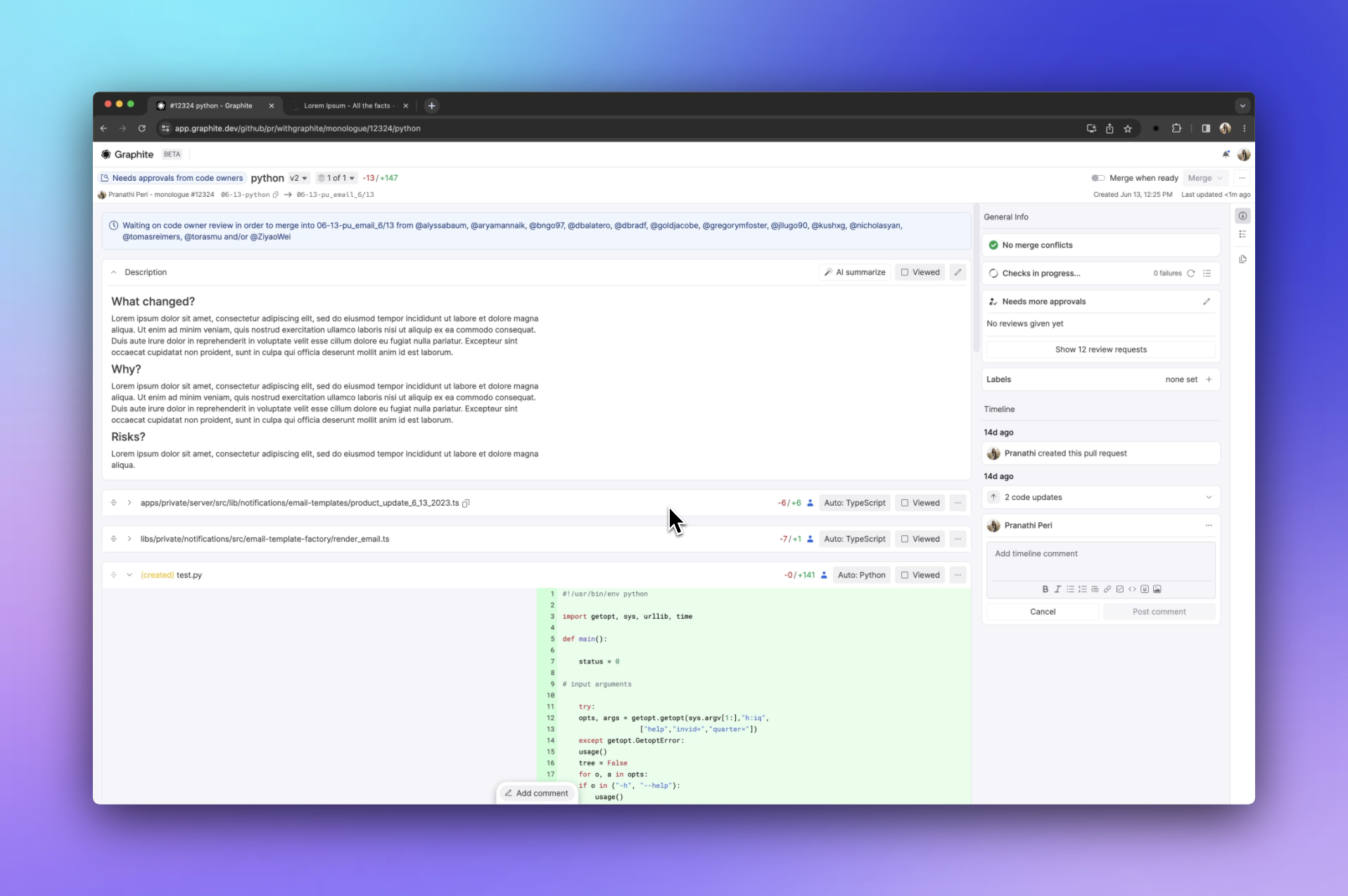
At Graphite, we believe the code is the most important part of a pull request. With that in mind, we built our pull request page around the code rather than keeping all of the important information behind tabs.
## Insights
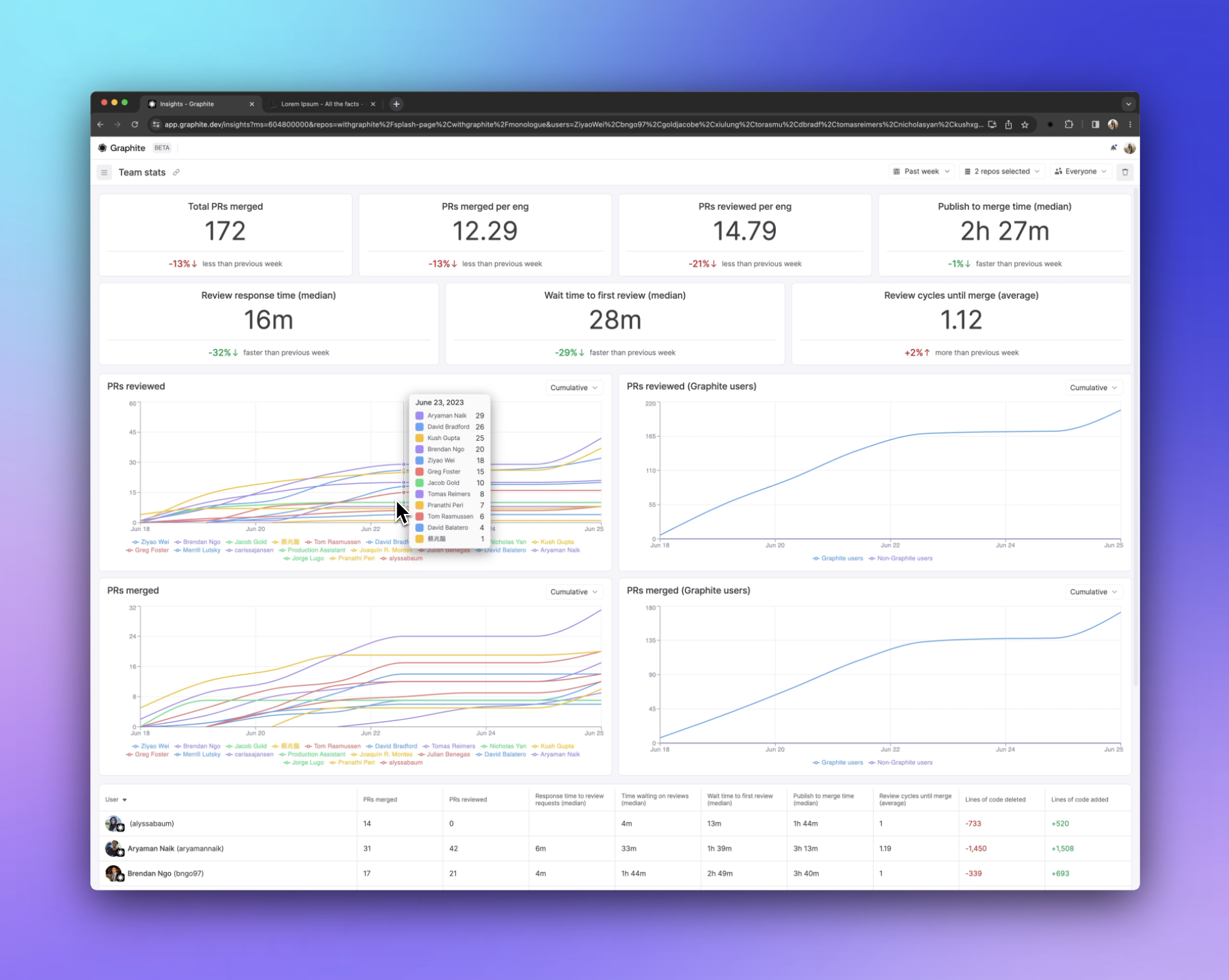
With [Insights](https://graphite.com/features/insights), you can create, save, and share custom views that query the review statistics of specific members or teams in your organization.
## Customizable meme library
The most important part of code review is definitely the memes (duh). Import your own memes into the customizable Graphite meme library, and use `/` aliases to include them in your comments as you're reviewing code.
## Notifications
Receive [Graphite notifications](https://graphite.com/features/notifications) in the app or in Slack.
Graphite's actionable [Slack notifications](/slack-notifications) are meant to be actionable and insightful—and like the CLI, can be used independently. You can configure the types of events that you will receive notifications for in Slack.
## Graphite Merge Queue (paid tier)
Merge queues help increase the velocity of your team's ability to push code by automating merges into your trunk branch. The [Graphite Merge Queue](https://graphite.com/features/merge-queue) honors the dependencies between PRs in a stack using our [fast-forward merge strategy](/graphite-merge-queue#supported-merge-strategies).
[Reach out to schedule a demo or trial](mailto:hello@graphite.com) of the Graphite Merge Queue.
## Sync
[Sync](https://graphite.com/features/sync) allows you to use Graphite even if others on your team don't. Your Graphite account connects to your GitHub account and continuously syncs every pull request, comment, and reaction—instantly and securely.
## VS Code extension
The [Graphite Visual Studio Code extension](https://graphite.com/features/vscode) simplifies `git` operations, state, and workflows, and packages the power of Graphite into a friendly UI.
## Get in touch
Want to learn more about Graphite and how it can supercharge your code review experience? Reach out to [schedule a demo or learn more](mailto:hello@graphite.com).