

Configuration options
Rungt config to open an interactive menu which lets you configure your Graphite CLI. The options are described in more detail below.
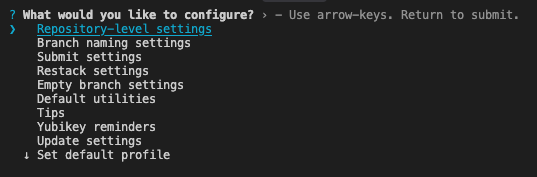
User-level configuration
Branch naming settings
If you don’t specify a name for your branch when usinggt create, then Graphite will generate one for you based on the commit message.
There are several options to configure:
- A custom prefix (for example, initials).
- Whether or not the date is prepended to the branch.
- Whether to allow certain characters like slashes and uppercase letters
- The character to replace unsupported symbols (for example, whitespace and anything other than alphanumeric characters, periods, dashes, underscores, and slashes.)
Submit settings
Set PR metadata in CLI Graphite lets you prepare your PR for review in the web UI by default. This allows you to preview markdown, pull options like reviewers and labels from downstack PR’s, and update all PR’s in a stack at once. Enable this setting to instead default to writing PR description in the CLI. PR description Graphite includes your GitHub PR template in the commit message by default. Graphite can include the commit messages of your branch in the body of your PR automatically on submit. If you enable this, you can choose whether or not to also include your PR template. If you only have a single commit on your branch, the first line of the message (its title) will not be included as this is already the default for the name of the PR.Rebase behavior
Thegit rebase flag --committer-date-is-author-date is useful if you don’t want your Graphite restack operations to update the committer date of the commits in your branches. In order to have Graphite’s internal rebases use this flag, you can enable this configuration.
Sync settings
Toggle to automatically delete merged or closed branches duringgt sync and gt get operations.
Empty branch settings
Specify how Graphite should handle empty branches after an operation (keep or delete).Default utilities
By default, Graphite uses thegit editor for drafting PR descriptions and other flows that require editing text. You can configure a different editor.
By default, Graphite opens PR descriptions and other flows that require editing text in the git pager. You can configure a different pager, or disable paging entirely.
Note that just like git, Graphite sets the environment variables LESS=FRX and LV=-c if they are not already set. If something else is setting your LESS env var, you can use gt user pager --set "less -FRX" to get the recommended pager settings.
Tips
Toggle on and off inline tips in the Graphite CLI.Yubikey
If you use a Yubikey to protect your GitHub SSH key, you may be used to Git commands reminding you to touch it. Graphite is not able to print this output directly to the CLI due to how Git calls SSH, so you can enable this configuration to be reminded when Graphite is about to run a command that requires you to touch your Yubikey.Update settings
You can individually enable or disable automatic updates and update prompts. As of version 1.7.4,gt is able to automatically update in the background. These automatic updates are disabled by default for existing gt installs that get updated to 1.7.4 or higher. They are enabled by default for new gt installs.
The configuration for automatic updates and update prompts gets set in the ~/.config/graphite/user_config file:
Set default profile
See how to configure multiple profiles in Profiles and authentication. Set your profile by runninggt config -> Set default profile to see a list of your alternative profiles:


Repository-level configuration
Repository-level configuration is stored in the
.git folder of your repository.Trunk branches
Configure one or more trunk branches. For developing on multiple trunk branches see our tutorial here.Git remote name
Graphite defaults to pushing to and pulling fromorigin. If you have configured a different name for your remote, you can set it manually.
GitHub repository information
Once the remote URL is set, Graphite infers the GitHub repository name and owner from the remote URL, but in cases where they are not inferred correctly, you can override them.User configuration file
User configuration for Graphite CLI gets stored in theuser_config file in the ~/.config/graphite/ directory. This user configuration applies globally when executing gt commands.
To apply a different user configuration locally, such as if you work with clones of the same repo and want different branch name settings for each, you can create a user_config file in another directory and set the $XDG_CONFIG_HOME environment variable to that directory’s path.
Profiles and authentication
Using Graphite CLI with multiple GitHub user accounts/auth tokens
Multiple profiles are supported from
gt version 1.7.2 onwards ~/.config/graphite/user_config file you can set alternative named profiles so that each can make use of separate authentication tokens. Profile names and your default profile selection live in user_config.
For gt version 1.8.4 and later, the corresponding tokens can be stored in ~/.config/graphite/auth (see more in Auth file). On older versions, or as a fallback, tokens can be stored directly in user_config.
Example user_config file
Example showing user_config with just profile names (tokens would be stored in the auth file):
user_config (supported on all versions with multiple profiles):
gt config or GRAPHITE_PROFILE environment variable:
Profile precedence
When resolving which profile is active,gt checks (in order):
GRAPHITE_PROFILEenvironment variable (overrides the saved default)profilefield inuser_config(set viagt config→ Set default profile)- A profile named
"default"inuser_config.alternativeProfiles
The Set default profile option in
gt config only lists profiles defined in user_config.alternativeProfiles. A profile can exist only in auth if you select it with GRAPHITE_PROFILE, but it will not appear in the gt config profile picker until you add the name to user_config.Auth file
The dedicated
auth file is supported from gt version 1.8.4 onwards. ~/.config/graphite/auth instead of ~/.config/graphite/user_config. When you run gt auth --token <token>, the CLI saves the token to the auth file by default. If the auth file cannot be written, gt falls back to user_config and prints a warning.
The auth file uses the same alternativeProfiles JSON schema as the user_config does for multiple profiles. Each profile object supports:
name(required)authToken(optional)
authToken for the default profile, or define per-profile tokens under alternativeProfiles with matching name values. If the active profile is "default" and a matching entry exists in alternativeProfiles, that profile’s token takes precedence over the top-level authToken.
Example auth file
For a single default account:
auth with profile names that match those in user_config:
Auth token precedence
When resolving which token to use,gt checks (in order):
GRAPHITE_AUTH_TOKENenvironment variable (if set, always wins)~/.config/graphite/authfor the active profile~/.config/graphite/user_config(legacy fallback if theauthfile is missing, unreadable, or has no token for that profile)
auth is used and any matching token in user_config is ignored. You can remove legacy authToken fields from user_config to avoid confusion.
Overriding profiles and auth tokens with environment variables
You can set theGRAPHITE_PROFILE environment variable with the name of the profile you want to run gt commands with:
The
GRAPHITE_AUTH_TOKEN environment variable is supported from gt version 1.8.3 onwards GRAPHITE_AUTH_TOKEN environment variable to override authentication tokens from config files and profiles. This is useful for CI/CD pipelines, containerized environments, or any context where you don’t want to rely on a config file.
Set up shell completion
Graphite supportszsh, bash, and fish tab completion. You can run one of the following commands:
For zsh
Terminal
For bash
Terminal
Terminal
For fish
Terminal
Set up aliases for Graphite CLI commands
You can set aliases forgt commands and customize the flags that commands will be run with.
Aliases get stored in the aliases file in the ~/.config/graphite/ directory. They will apply globally when executing gt commands.
Run gt aliases as a shortcut to open the aliases file in your terminal’s default editor.
Aliases for ss, ls, and ll are defined by default. If you delete this file, it will be recreated with the default aliases.
The first word of each line in the file is the alias, the second is the command and the following words are the flags. Lines starting with # are ignored:
aliases