
Table of contents
- What makes code review tools so critical?
- 8 of our favorite code review tools
- Key considerations while choosing code review tools
- Frequently asked questions
- Take the steps towards faster code reviews and increased dev velocity
Every commit can feel like a battle.
There’s the PR, the review, the comments, the nits, the edits, and the updates. Then, you probably do it again—another review, more comments, even more nits. It’s no wonder many developers are not big fans of the code review workflow.
That’s why so many developers end up on Google, looking for strategies, ideas, and tools that will make the code review process a bit more bearable. (Hey there!)
In this article, we’ll share a few of our favorite code review tools and what we think they bring to the table.
Before we dig in, let’s be clear that code review software won’t magically take away the pain. They won’t fix a broken culture or address underlying conflict within your team. Nevertheless, technology can open up new workflows, processes, and mindsets that make it a bit easier to navigate. In some cases, they can even unlock major changes to how your team works and break through old barriers and roadblocks.
Hopefully, one of these tools is transformation in that way for you.
What makes code review tools so critical?
You’ve likely used your fair share of code review tools over the years. Have you ever stopped to think about what makes a tool particularly good or useful?
Let’s begin by considering how code review tools fit into the development lifecycle, how they create value for developers and teams, and then which features will best serve your needs.
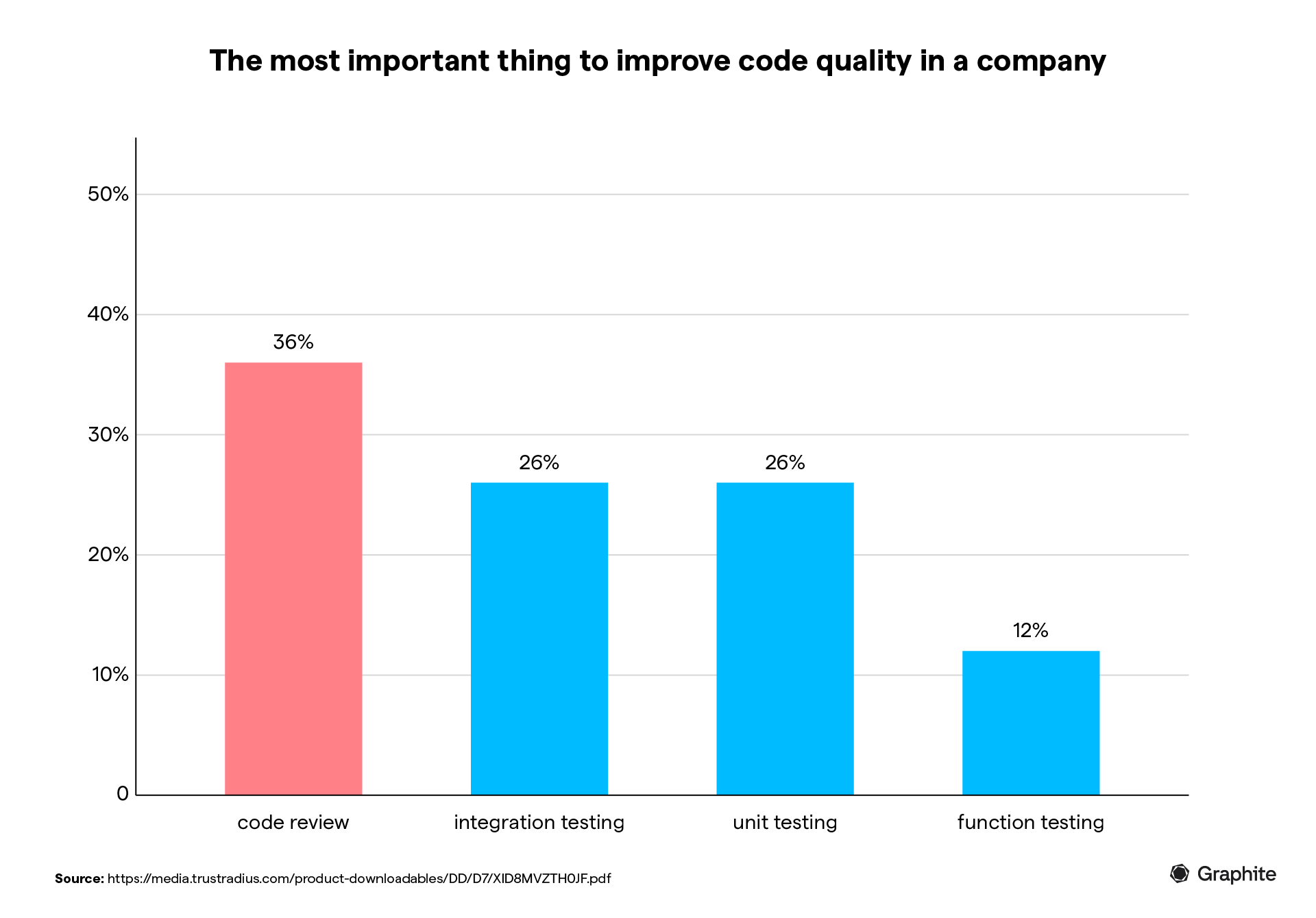
We know that code reviews are critical for QA and software quality.
In fact, 36% of the companies said code reviews are the best way to improve code quality. Over 57% of companies use tool-based code reviews or combination methods (including ad-hoc and IDE-based reviews) to improve code quality.
We also know that most teams spend a pretty big chunk of time conducting code reviews.
Half of development teams spend an average of two to five hours weekly on code reviews. About one in seven teams spend more than 10 hours per week.
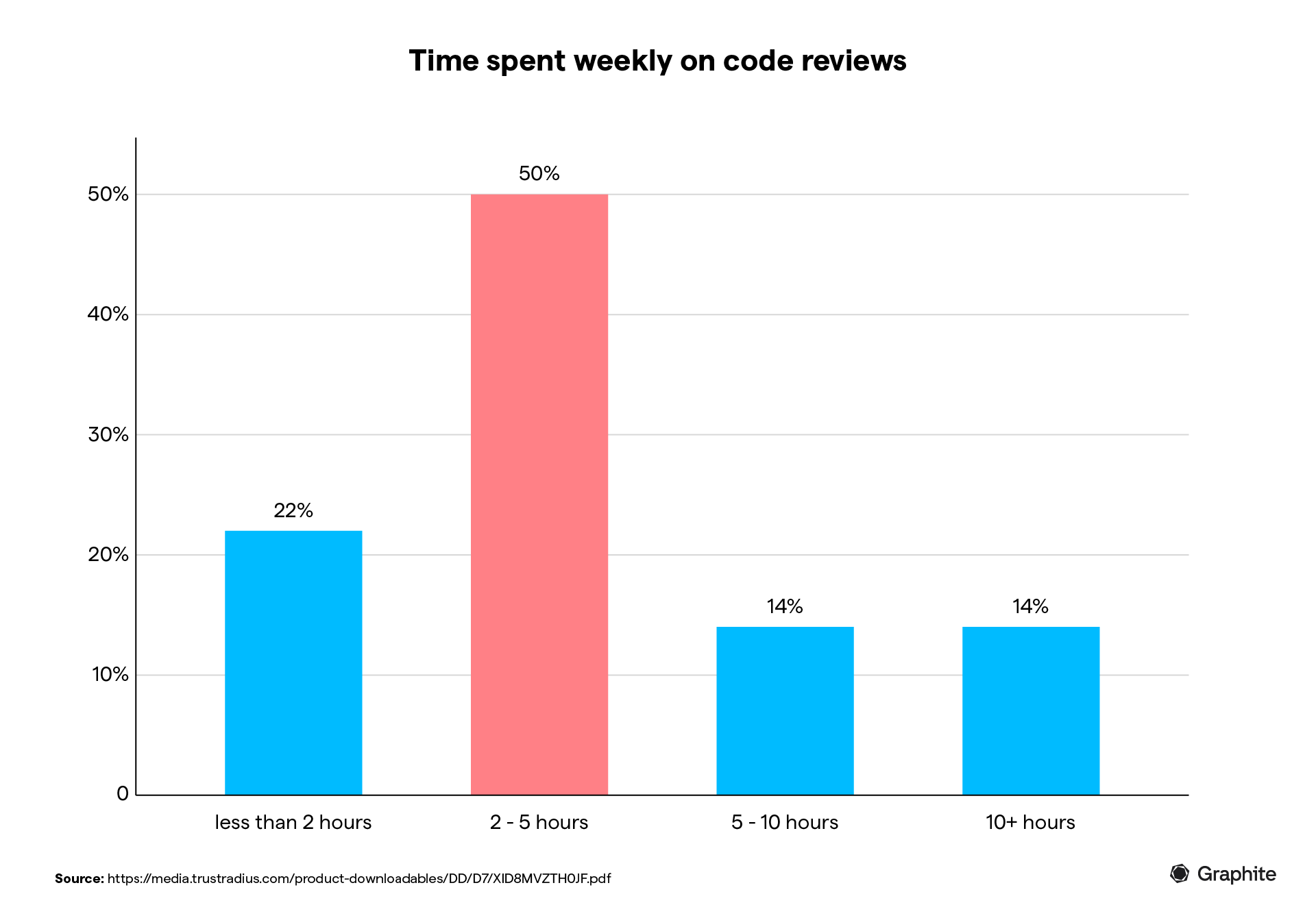
Of course, most teams don’t want to spend five hours per week doing code review, let alone 10 or more. Inefficient code review leads to slower cycles, missed deadlines, and team-wide frustration. That’s usually where code review tools come into play.
We use code reviews to improve code quality.
We use code review tools to improve the efficiency—and effectiveness—of the review process.
How?
There are two functional use cases:
Review automation: Code review tools can help identify code changes based on specific criteria and rulesets. They can also analyze code changes, highlight potential issues (such as memory leaks), and optimize code integrity and security.
Review facilitation: They can also facilitate the human review process—making it easier for developers to contextualize changes and identify issues or optimization opportunities.
Depending on your specific circumstances, you may be looking for features aimed at one or the other—or both.
Ready to speed up your code reviews? Try Graphite for free and experience faster PR workflows with stacked reviews and intelligent automation.
8 of our favorite code review tools
Each year brings new code review tools to the market along with new promises to “revolutionize” or “fix” the process. Some of them are total duds. Some of them introduce some real innovation that helps teams level up.
It makes sense that, even if you’ve used a million code review tools in the past, you continue to seek out, test, and evaluate some of these tools each year. You never know when you’ll land on something that feels like a major upgrade.
In our list, we’ve included our favorite code review tools that you should consider for your development workflow in 2024. Some will be obvious, but others may be new to you or your team.
1. GitHub
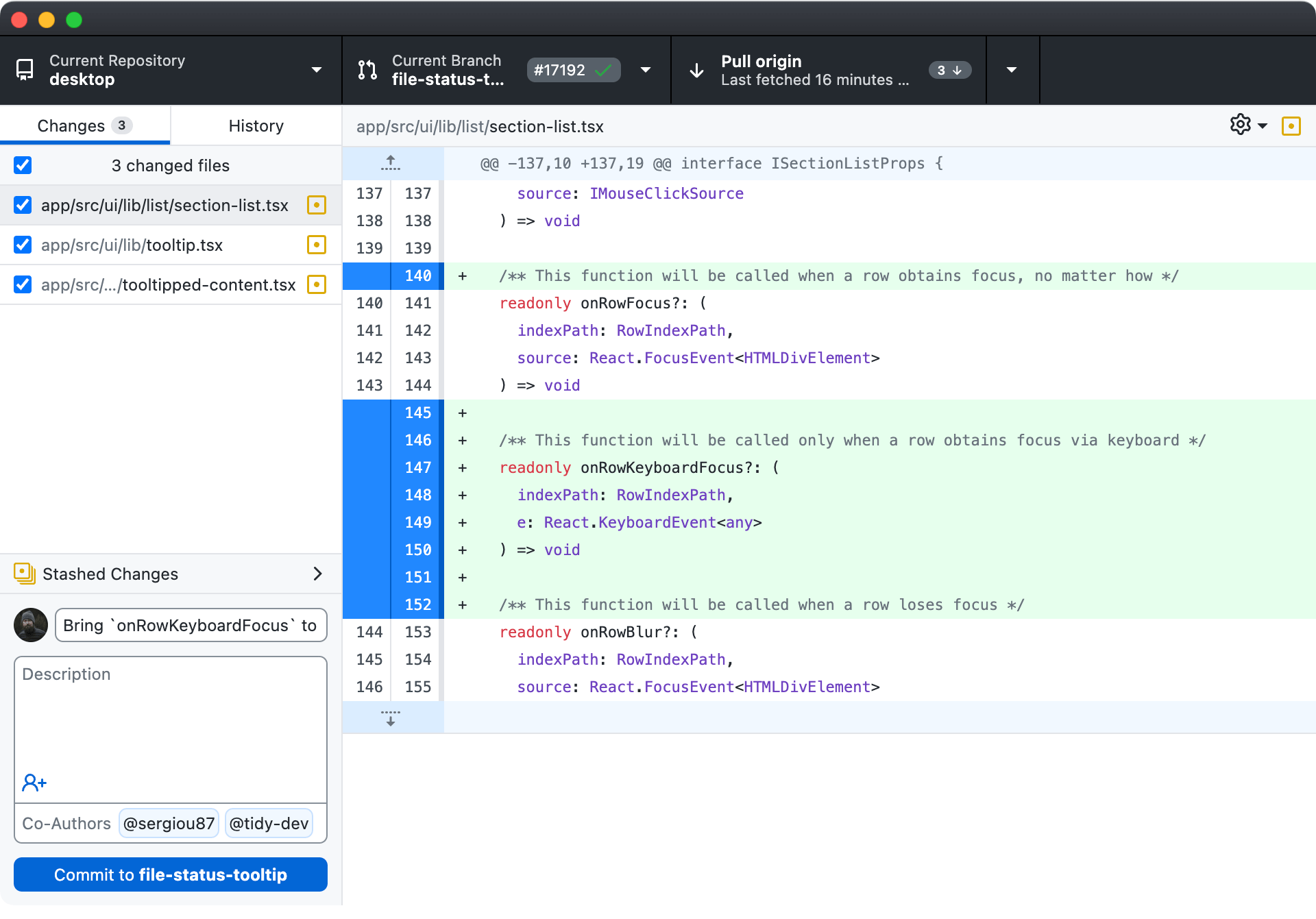
GitHub, the leading Git-based code hosting platform, hardly needs an introduction. It seamlessly integrates code review features into pull requests, enabling users to inspect changes efficiently, engage in discussions, and approve merges.
Alongside robust version control mechanisms, it offers team collaboration features, including wikis, issue tracking, and project management tools. Highly scalable and reliable, GitHub supports teams of any size seeking a platform for code development.
Key features of GitHub
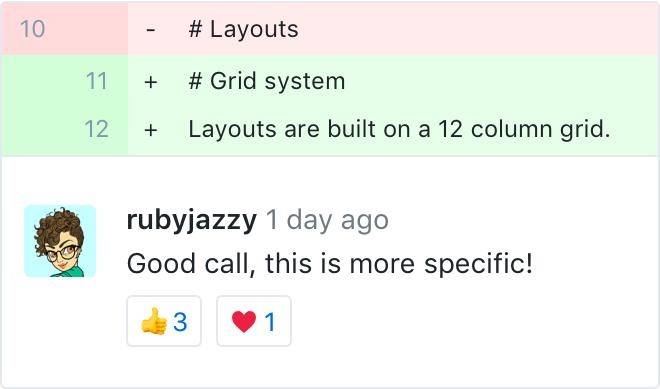
Pull request reviews: Supports inline comments on specific lines of code to review code changes, threaded discussions to clarify questions, and approvals with customizable rules to merge PRs.
Powerful version control: Offers capabilities for managing code history, branching strategies, commit management, and reverting changes and other tweaks needed for coordinating software development.
**Integrated issues: **GitHub Issues lets you create and track tickets for tasks, enhancements, and bugs. This feature allows for the assignment of tasks to team members, categorization with labels, organization by milestones, and filtering based on status.
Security: Scans dependencies and code changes to identify package vulnerabilities and insecure configurations. It then alerts you to these security risks.
Actions: This tool allows users to build custom software development lifecycle automation workflows, including CI/CD pipelines, triggered by various events.
Pricing
GitHub pricing is based on repositories and features, with options for individuals and organizations:
Free: Public and private repos with collaboration features for individuals and organizations.
Pro: Starts at $7/month for advanced code review tools, increased storage, and private repos.
Team: Adds team management capabilities starting at $9/user/month.
Enterprise: Further security, compliance, and deployment features for large businesses.
Verdict
As a secure, highly reliable code development ecosystem with integrated review mechanisms, GitHub can serve almost any team size and use case. For those deeply entrenched in Git workflows, it provides an indispensable set of capabilities.
2. Bitbucket
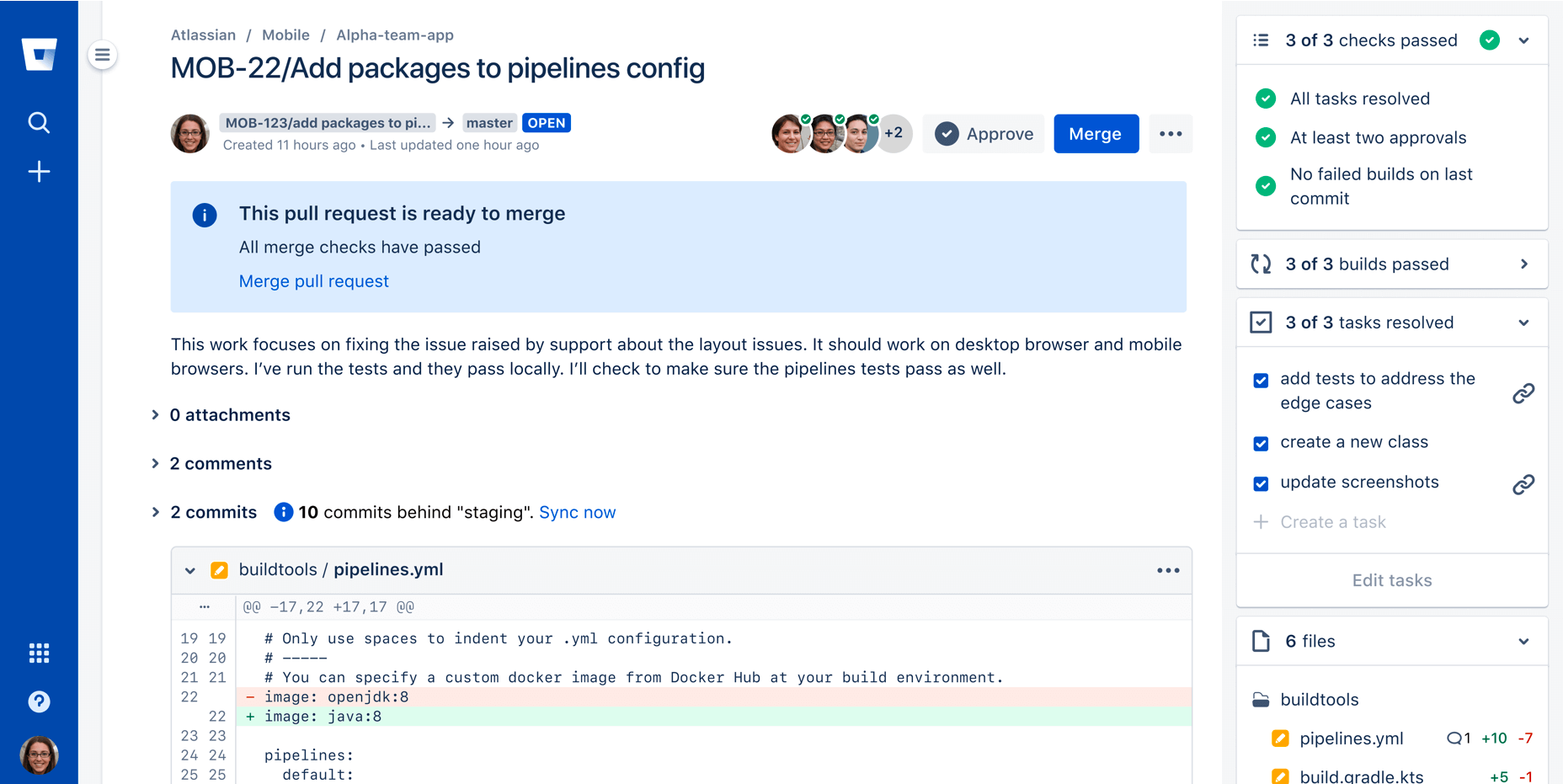
Bitbucket by Atlassian emphasizes Git code collaboration in the cloud, offering integrated review tools. It facilitates discussions via pull requests, enabling teams to iteratively perfect code changes.
With robust integrations, built-in CI/CD capabilities, and an emphasis on security, Bitbucket helps unify software teams across the Ops toolchain. Its pricing model scales for teams of varying sizes, making it versatile enough for enterprises.
Key features of Bitbucket
Pull requests: Allows creating PRs from feature branches to enable peer review of code changes before merging to the main branch. It also supports inline comments and threaded discussions right from the Bitbucket interface.
Integrations: Provides deep two-way integration with Jira for connecting code to tasks and other Atlassian tools like Confluence and Trello to enrich collaboration.
Smart mirroring: Helps keep a geographically distributed backup of repositories to ensure availability. Protects against outages.
Pipelines: Offers built-in continuous integration and delivery capabilities, including customizable pipelines, automated branching models, and workflows.
Advanced permissions: Allows managing access permissions at a granular level, including read, write, and admin permissions for users across repositories.
Code insights: Provides useful metrics into repository contributors, commit history, pull request reviews, and code development activity to help track progress.
Merge checks: Configurable rules can be defined to control what requirements must be fulfilled before pull requests are allowed to merge, protecting branch quality.
Pricing
Bitbucket offers pricing suitable for teams with different collaboration requirements:
Free: For teams of up to five users, with a built-in project management tool.
Standard: Starts at $3 per user/month billed annually and adds advanced security and integrations.
Premium: Further security, controls, and integrations plus dedicated support, starting at $6 per user/month.
Verdict
If your team is already in the Atlassian ecosystem, checking Bitbucket for your code review needs makes sense. The seamless integration can be a perfect addition to your team without disrupting workflows.
3. Codacy
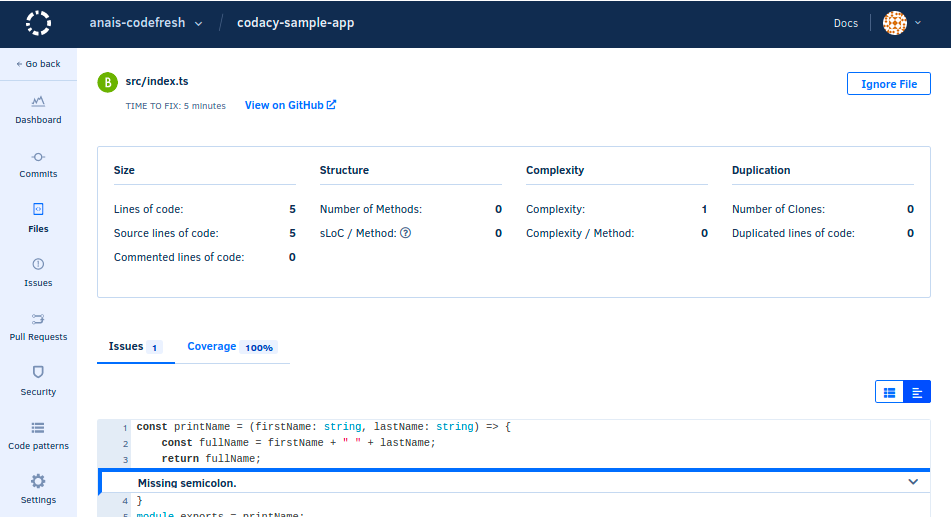
Codacy takes a quality and security-focused approach to code analysis. It automatically inspects code changes via commits and pull requests, identifying potential issues using customizable rules.
Codacy can monitor code quality across various programming languages in both self-hosted and SaaS forms. It offers coverage change tracking to detect bugs and quality issues in code, Slack notifications to stay updated on analysis results, and integrations with other development tools. These features help developers embed quality and security analysis within their workflows without disrupting productivity.
Key features
Automated code analysis: Performs static analysis, runs linter scans, and performs unit tests on commits and pull requests. It evaluates the code against established quality and security standards.
Customizable rulesets: Allows for configuring rulesets tailored to specific project needs. You can modify the severity levels for various detected issues, including styling, security, and error-prone patterns.
Clear documentation: Offers descriptions and rectification references for all identified issues so developers can better understand and fix flagged reports.
Code metrics: Gathers metrics such as duplication, complexity, and test coverage at the codebase, file, and function levels, enabling detailed assessments.
Slack integration: Supports configuring Slack notifications to update project channels when pull requests are created or merged along with details.
IDE integrations: To avoid context switching, developers can view detailed reports directly within popular IDEs like VS Code, IntelliJ, and PyCharm.
API access: Allows programmatic access to issues, metrics, badges, and other analysis data for building custom dashboards, workflows, and more.
Pricing
Codacy pricing is based on the number of developers and repositories, as well as hosting preferences:
Free: Unlimited public repositories with basic scan capabilities.
Pro: Starts at $15 per developer/month for priority analysis, badges, and enhanced features.
Verdict
For teams looking to rigorously analyze code quality and security, Codacy's automation capabilities are invaluable. Its flexibility in rule configuration and the breadth of integrations make it versatile across varied development environments.
4. GitLab
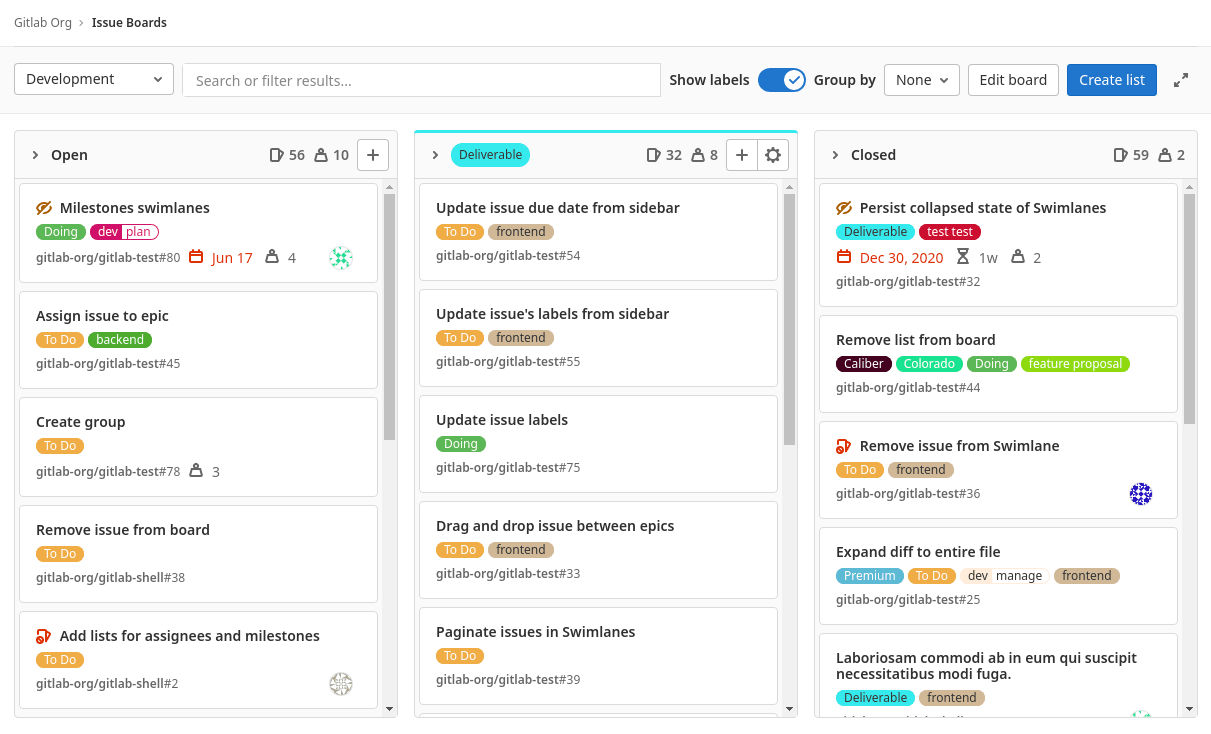
GitLab positions itself as a single application for software development, security, and operations—a complete Ops platform. It aims to systematize workflows, allowing for faster innovation through stages via built-in capabilities for planning, code hosting, CI/CD, monitoring, and security.
Its integrated code review mechanisms based on merge requests enable inspecting changes made to the Git repository before acceptance. Combined with issue tracking, Wikis, and other tools to coordinate the development, it provides an end-to-end system spanning the lifecycle.
Key features
Merge requests: Allows creating branches and opening MRs to review and discuss the code differences before integration with the central code base.
Granular user roles: Supports configuring fine-grained user roles with customized permissions for code, issues, merge requests, etc. Enables access control.
Compliance scanning: Offers built-in static application security testing (SAST) capabilities to detect vulnerabilities early without requiring specialized tools.
Value stream analytics: Provides insights into cycle time, workflow efficiency, and lead time for changes to move across planning, dev, review, and monitoring stages.
Interactive web terminals: Developing and troubleshooting code can be done directly within GitLab UI through web-based terminal access without local setup.
Feature flags: Provides the ability to ship features in disabled mode and selectively roll them out to subsets of users—useful for progressive delivery.
Integrated container registry: Enables including CI/CD jobs for building and storing Docker images securely within GitLab, avoiding external tools.
Pricing
GitLab pricing is based on capability tiers focused on different collaboration requirements:
Free: $0 per user/month. Includes 5GB storage, 10GB monthly transfer, 400 monthly pipeline minutes, up to 5 users per group.
Premium: Starts at $29 per user/month billed annually. Adds 50GB storage, 100GB monthly transfer, 10,000 monthly pipeline minutes, advanced admin controls, and priority support.
Ultimate: For enterprise teams. Includes all Premium features plus 250GB storage, 500GB monthly transfer, 50,000 monthly pipeline minutes, application security testing, portfolio management, custom roles, and value stream analytics.
Self-managed: Custom pricing for on-premise installation with managed infrastructure.
Verdict
GitLab can be a great choice for teams looking to consolidate their toolchain under a single platform spanning Ops needs.
5. AWS CodeCommit
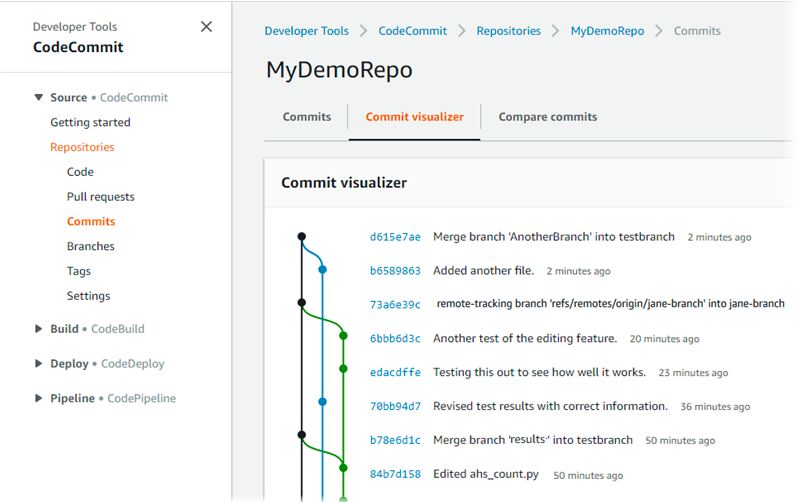
CodeCommit is Amazon Web Services' fully-managed source control service, allowing teams to collaborate on code changes securely. It provides functionality similar to GitHub and Bitbucket but deeply integrated natively with other AWS offerings.
Hosting Git repositories within AWS with encrypted data transmission mechanisms helps CodeCommit centralized version control mechanisms for development teams operating in the cloud. It also offers smoother code review workflows through pull requests and notifications while integrating seamlessly with associated AWS services.
Key features
Pull requests: Allows creating branches and opening PRs to review them before merging code changes. CodeCommit, like most other code review tools, supports inline or threaded code review comments.
Encryption: Uses AWS Key Management Service encryption for data security at rest and in transit.
IAM permissions: Enables managing repository access at a granular level for users and roles via AWS Identity and Access Management.
Audit logs: Event logging for activities such as pull requests, comments, and approvals, facilitating thorough audits.
Integrations: Allows interoperability with other AWS services like CodeBuild, CodeDeploy, CodePipeline, and others for end-to-end workflows.
Notifications: When pull requests are opened or updated, notifications can be sent to subscribers via the AWS event bridge.
AWS CLI: All common Git commands can be executed via the AWS Command Line Interface for programmatic interactions.
Pricing
CodeCommit follows a pay-as-you-go model based on active users and storage with a generous free tier:
Five active users for free per month.
$1 per additional active user/month.
$0.06 per GB of storage per month.
$0.001 per Git request after the free tier.
Verdict
CodeCommit offers a tightly integrated code collaboration environment with review mechanisms for teams committed to an AWS-based development stack. Its security and managed scalability make it suitable for the cloud.
6. Azure DevOps
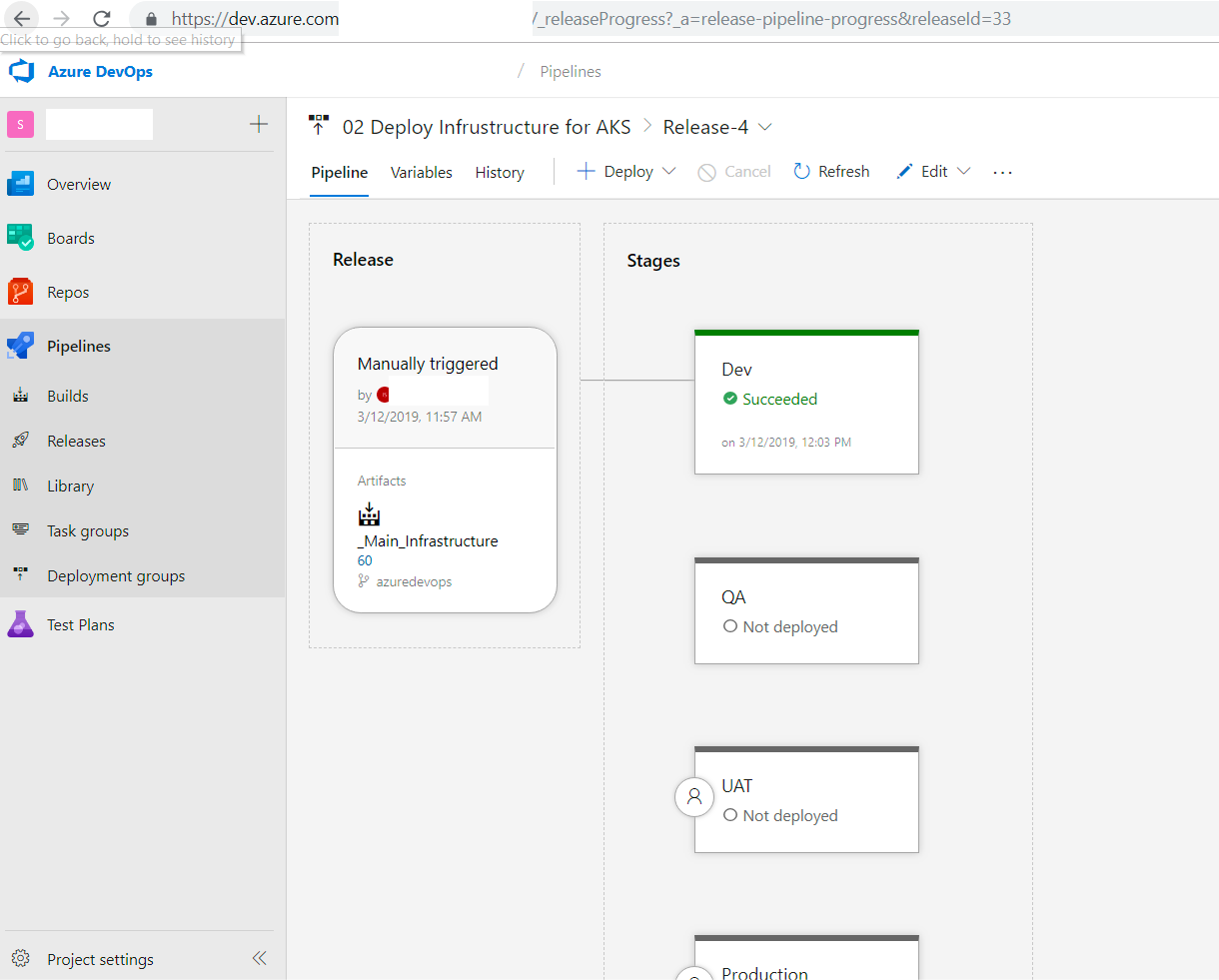
Azure DevOps, previously known as Visual Studio Team Services (VSTS), provides a comprehensive collaboration suite supporting the entire application lifecycle for Agile development teams.
At its core, it has robust version control mechanisms via Azure Repos, allowing the hosting of unlimited private Git repositories. Code changes can undergo inspection through pull requests with integrated code review tools.
With extensibility through third-party integrations, Azure DevOps aims to provide a flexible DevOps platform catering to varied team workflows. Its pricing model scales from small teams to large enterprises.
Key features
Azure Repos: Enables creating branches to make changes and opening pull requests to review differences before integration.
Kanban boards: The ability to visually track work items representing tasks, features, bugs, etc., through different stages on a board.
Build pipelines: Allows configuring jobs to automate building code and producing packages using languages and frameworks of choice.
Release pipelines: Enables setting up release automation workflows for deployment to various environments, including testing, staging, and production.
Test plans: Supports creating test cases and suites integrated with the development lifecycle for quality assurance.
Insights: Offers visibility into delivery process metrics like lead time, cycle time, code changes, and tests to assess team efficiency.
Pricing
Azure DevOps pricing is based on two axes—user licenses and CI/CD capacities:
Free: For up to five users, with unlimited private Git hosting.
Basic license: $6 per user/month with all collaboration features.
CI/CD parallel jobs: Starts at $40 per job/month on top of user licenses.
Verdict
Azure DevOps provides an enterprise-grade, cloud-based dev services platform tailored for Microsoft-centric teams. The integrated code review and quality assurance capabilities offer end-to-end Agile development orchestration.
7. Collaborator
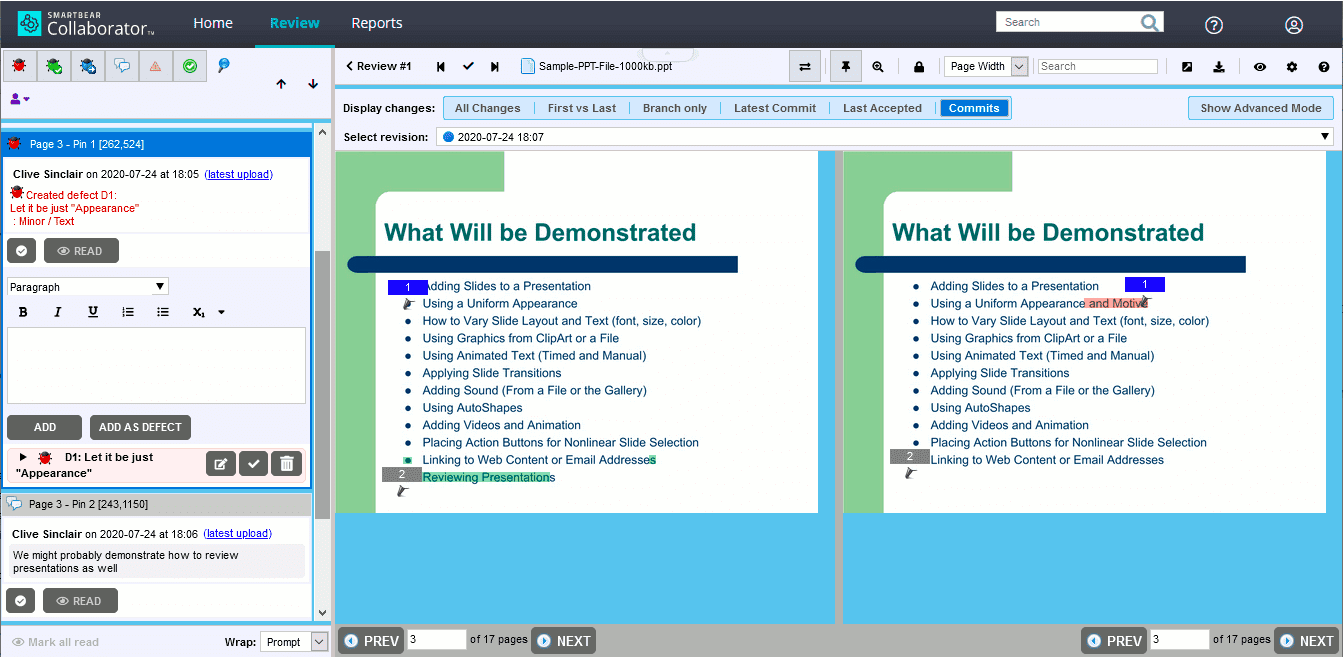
Collaborator by SmartBear focuses on enabling comprehensive peer code and document review across teams. Beyond reviewing source code, it helps inspect documents, models, images, and other artifacts produced during software development.
It integrates tightly with version control systems like Git, Mercurial, and Perforce and content tools like MS Office to bring review workflows to the produced assets directly. With customizable permissions and signatures, Collaborator emphasizes auditability and compliance.
Key features
Broad review scope: Enables peer review of source code files, Word documents, Excel models, PowerPoint slides, and PDF diagrams within a single tool.
Customizable workflows: The ability to define multi-step workflows configuring actions like screening, reviewing, and verifying based on file types.
Audit trail: Maintains detailed historical records of reviews and communications with electronic signatures securing approvals.
Reporting features: Offers graphical dashboards and metrics, providing insights into review turnaround times, open issues, and member productivity.
IDE integrations: Embed code reviews within IDEs like Visual Studio, Eclipse, and IntelliJ by installing plug-ins, avoiding context switching.
Advanced authentication: Supports LDAP, SAML, and OAuth integrations to enforce corporate authentication policies during system access.
On-premise support: Can be installed directly within internal infrastructure, enabling air-gapped review processes for IP protection.
Pricing
Collaborator is licensed based on teams, servers, and capabilities:
Team license: Starts at $710 per year for up to five users.
Enterprise: $1270 per year for each concurrent review license.
On-premise installation options with customized modules.
Verdict
For teams looking for comprehensive, compliant peer review mechanisms spanning beyond source code, Collaborator can be a good option. Its wide integration capabilities allow embedding reviews across various development lifecycle stages.
8. Graphite
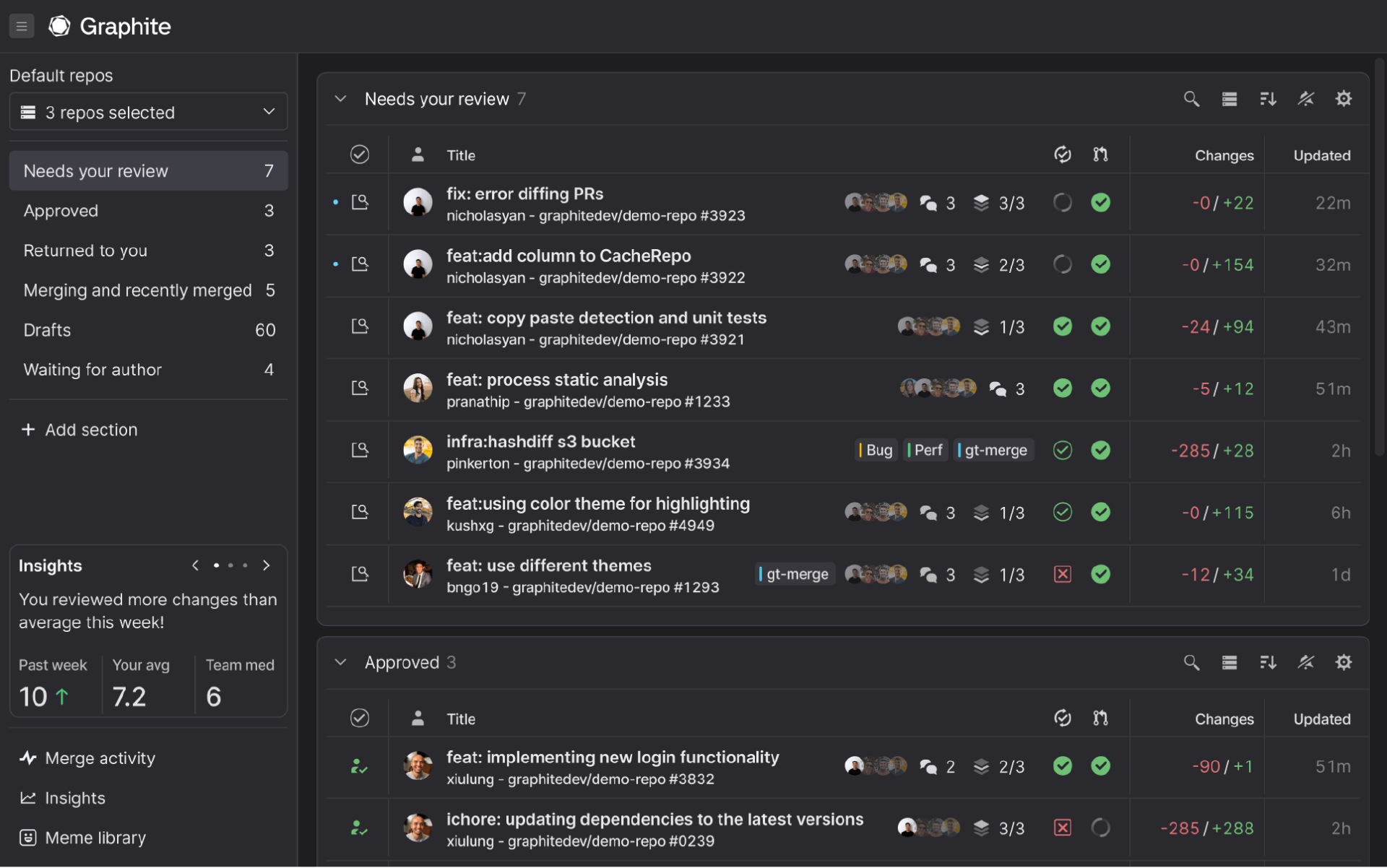
Graphite is a modern code review platform built to help engineering teams ship faster without being blocked. It transforms GitHub workflows by making it easy to create, review, and merge smaller, stacked pull requests—enabling developers to work on multiple changes in parallel without waiting for reviews to complete.
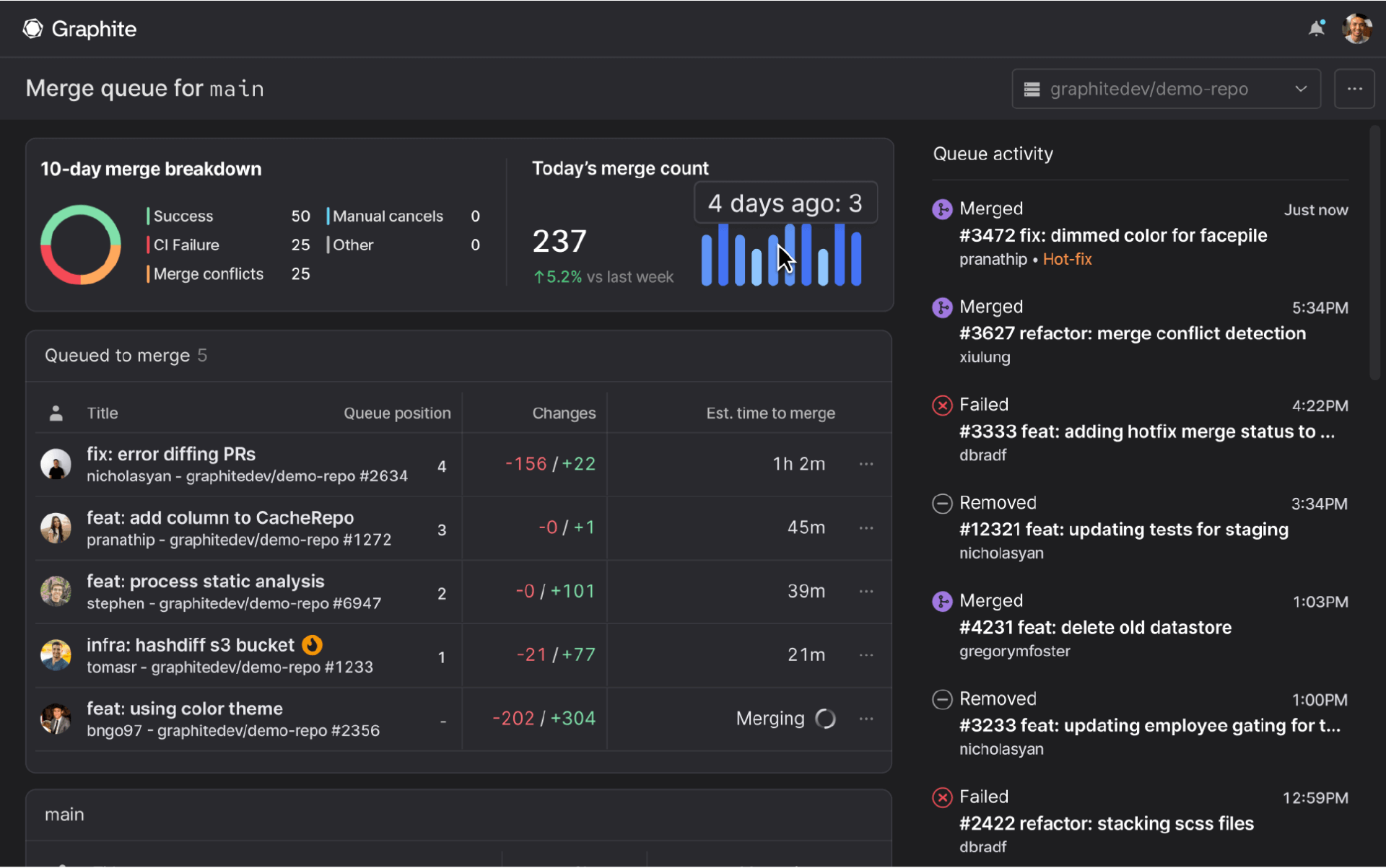
Used by engineering teams at companies like Datadog, Ramp, Watershed, and Vercel, Graphite works seamlessly on top of GitHub, requiring no migration or disruption to existing workflows. With AI-powered code review, intelligent merge queues, and powerful automation capabilities, Graphite accelerates development velocity while maintaining code quality.
Key features of Graphite
AI code review: Graphite AI provides instant, intelligent feedback on every pull request, catching bugs, suggesting improvements, and enforcing team standards automatically. It learns from your codebase patterns and adapts to your team's conventions, providing context-aware reviews that go beyond basic linting.
Stacked PRs: Break down large features into smaller, dependent pull requests that can be reviewed and merged independently. This workflow enables parallel development, faster reviews, and easier debugging—without blocking on sequential reviews.
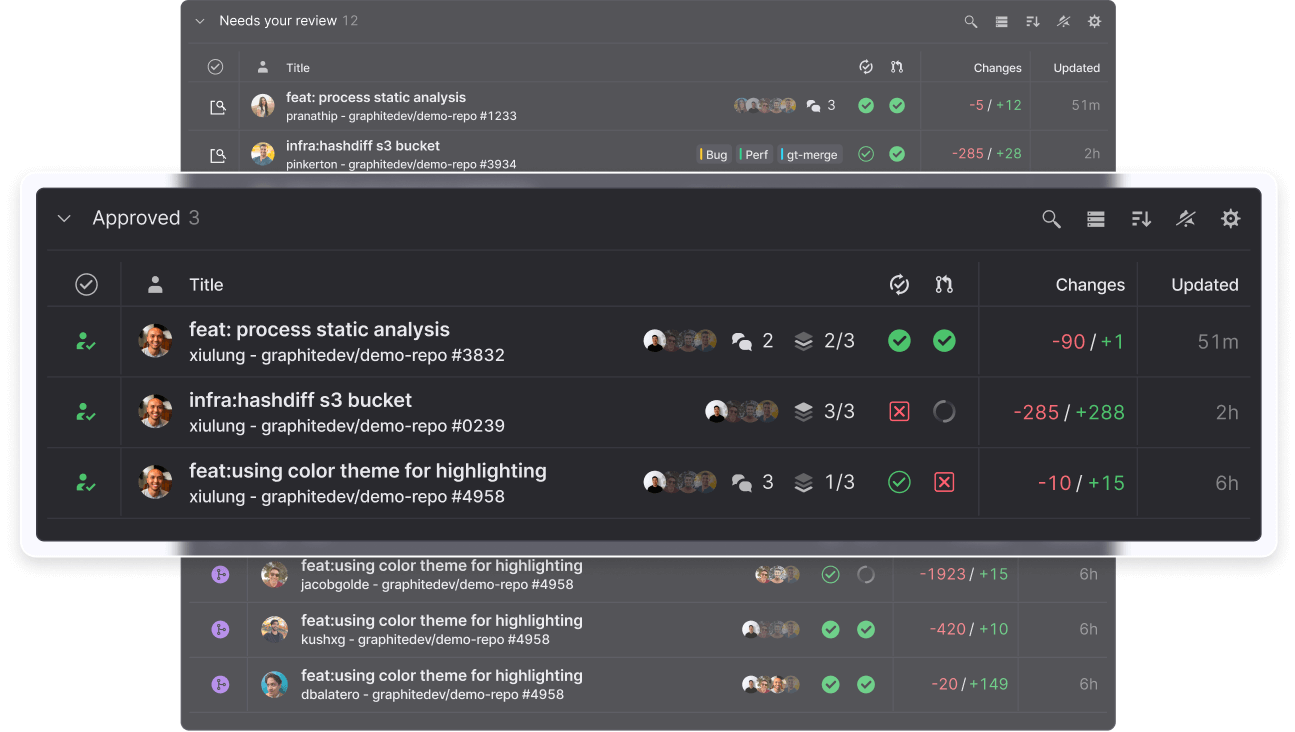
Pull request inbox: A unified dashboard that gives you a clear overview of all pull requests requiring your attention. Smart filters automatically organize PRs by status: needs review, approved, returned to you, merging, recently merged, and drafts.
Merge queue: The fastest way to merge pull requests while keeping your main branch green. Graphite's merge queue automatically rebases code, reruns CI tests, and merges PRs with one click—eliminating merge conflicts and broken builds. It optimizes CI runtime by intelligently skipping redundant tests across stacked changes, saving both time and infrastructure costs.
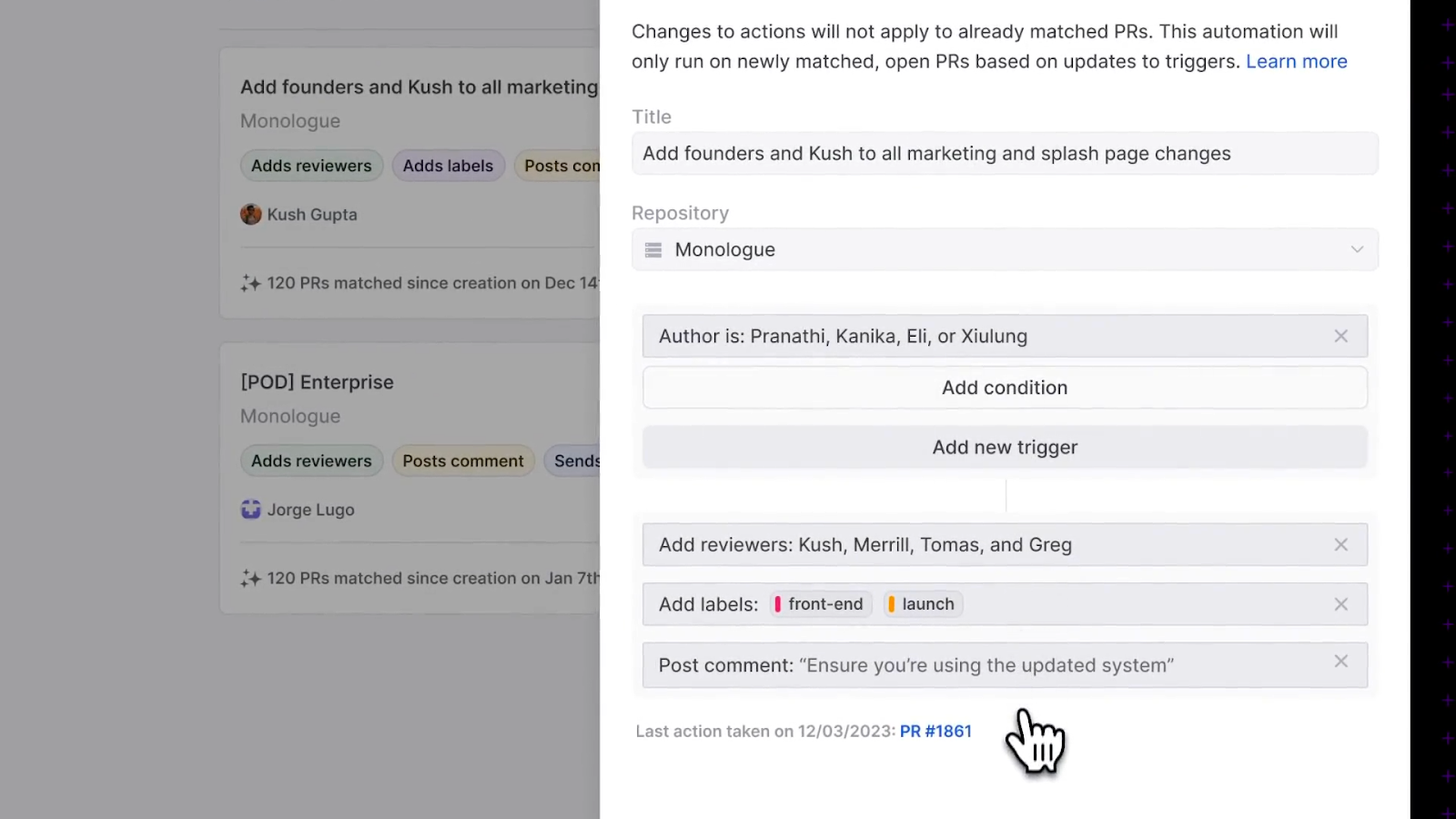
Automations: Create custom workflows with if-this-then-that rules triggered by any PR activity. Automatically assign reviewers based on code ownership, notify stakeholders in Slack, add labels, run checks, or attach deployment documentation. Teams using Graphite automations report shipping 20-50% more code and saving 7-10 hours weekly by eliminating manual coordination.
GitHub integration: Seamless two-way synchronization with GitHub means every PR, comment, and status update stays in sync. Your team can adopt Graphite incrementally—some members can use Graphite while others continue with GitHub's native interface.
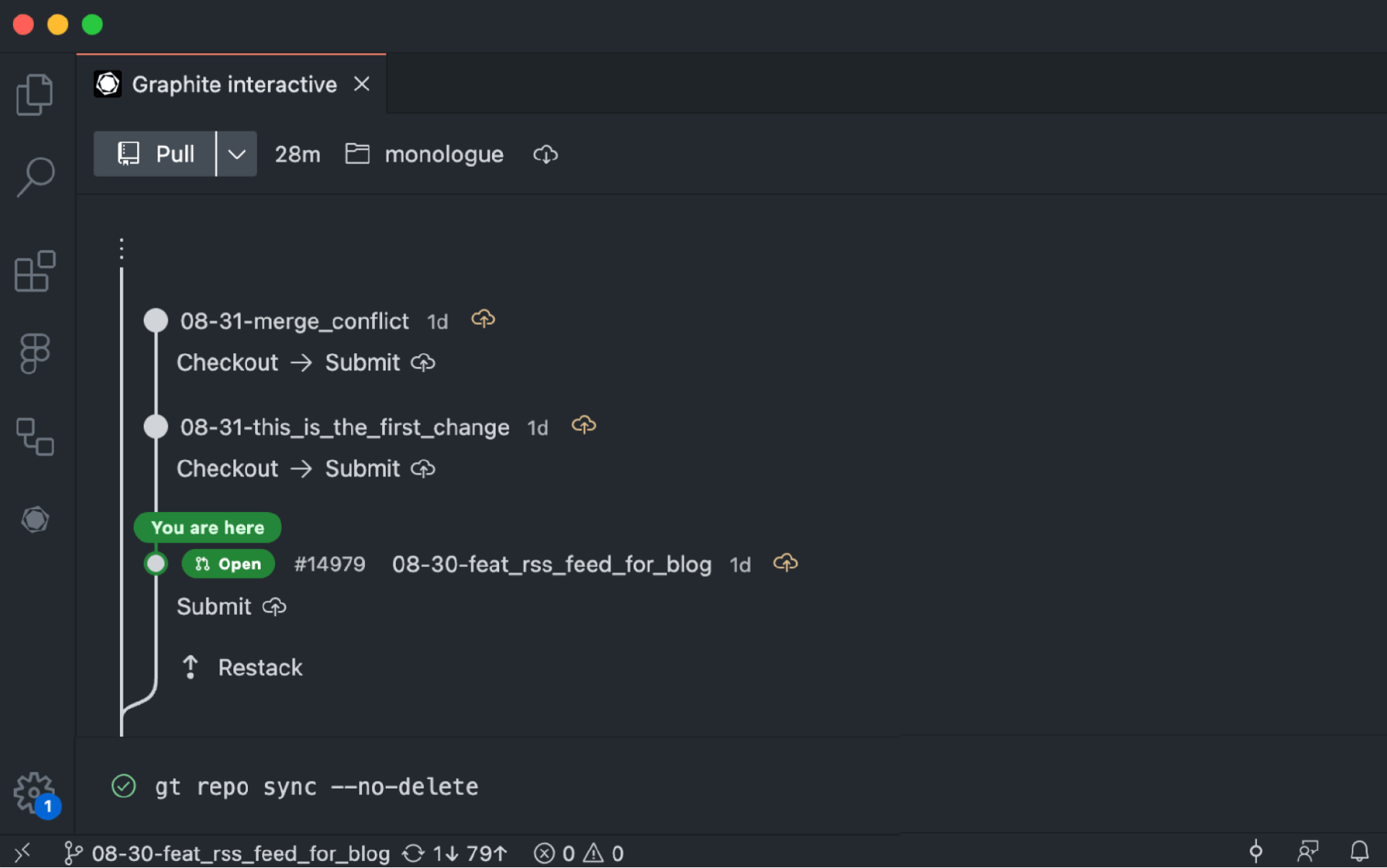
CLI and IDE extensions: Powerful command-line tools and extensions for VS Code, IntelliJ, and other popular IDEs let you manage stacks, create PRs, and navigate reviews without leaving your development environment.
Insights: Track key metrics like cycle time, review velocity, PR size distribution, and team throughput. Identify bottlenecks in your review process and make data-driven decisions to improve engineering efficiency.
For information on pricing, check out the pricing and packaging page here.
Verdict
Graphite is the ideal choice for engineering teams that prioritize shipping velocity and want to modernize their code review workflow without abandoning GitHub. Its AI-powered reviews catch issues early, stacked PRs eliminate review bottlenecks, and intelligent merge queues ensure your main branch stays green. Whether you're a fast-growing startup or an established company looking to accelerate development cycles, Graphite provides the tools to ship code faster while maintaining quality. It's especially valuable for teams familiar with workflows from Phabricator, Meta, or Google who want to bring that level of efficiency to GitHub.
Ship code faster with Graphite. Join thousands of developers at companies like Datadog, Ramp, and Vercel who use Graphite to stay unblocked. Start your free trial today →
Key considerations while choosing code review tools
Choosing a code review tool is like finding a good pair of shoes—you want the right fit. When trying on options, here are a few key things to check:
How will it affect your workflow? Make sure you understand how your workflow may need modification to accommodate the new tool. Not all workflow changes are bad, but unforeseen changes can create frustration. Having integrations and support for existing infrastructure in your tech stack is a must to ensure a smooth rollout. IDE and VCS support, role-based access, and merging with ticketing systems can simplify adoption.
**Does it support the desired automation? **With configurable triggers, teams can embed standardized and frequent code inspections, leading to higher quality without constant oversight. Also, custom rules tailored to your specific technology landscape help you make more meaningful assessments with little human intervention.
How is it deployed (and managed)? On-premise and SaaS options suit different needs. For some teams, having an internally managed system may be required due to regulations or process needs. Others may prefer the ease of cloud setup. While finding a tool with both options may be a good idea, it’s not a requirement. Find one that supports the deployment type that your business requires.
Does it meet security and compliance? You don't want data leaks causing trouble later down the line. Also, ensure it automatically checks for vulnerabilities in your code by matching with a large database of exploits.
How much will it cost (now and in the future)? Find a tool that scales with your needs by supporting teams of different sizes and also lets you scale the number of users, storage, or pipeline minutes for better value. Flexibility to adjust capacity as needs evolve minimizes long-term costs for businesses as you can simply continue to scale the same tool instead of migrating to a new one.
It generally requires tradeoffs to find the "best" code review tool that matches priorities. Choose something that plays nicely with existing systems and boosts productivity without compromising governance. You or your team can learn intuitively to capitalize on the most value in the long term.
Frequently asked questions
What is the best code review tool for small teams?
For small teams, GitHub's free tier or Graphite's starter plan are excellent starting points. Both offer robust code review features without significant upfront costs. As your team grows, you can easily scale to paid plans with additional features.
How much time should code reviews take?
Industry data shows that most development teams spend 2-5 hours per week on code reviews. However, with the right tools and practices like PR stacking, this time can be significantly reduced while maintaining or even improving code quality. The goal should be efficient, effective reviews—not necessarily quick ones.
What's the difference between automated and manual code review?
Automated code review tools (like Codacy) use static analysis to detect bugs, security vulnerabilities, and code quality issues automatically. Manual reviews involve human developers examining code logic, architecture decisions, and contextual appropriateness. The best approach combines both: automation catches common issues quickly, while humans focus on higher-level concerns.
Can code review tools integrate with my existing workflow?
Most modern code review tools offer extensive integrations with popular version control systems (Git), IDEs (VS Code, IntelliJ), and project management tools (Jira, Slack). Before selecting a tool, verify it supports your specific tech stack and workflow requirements.
What are stacked PRs and why do they matter?
Stacked PRs are a development workflow where you break large features into smaller, dependent pull requests. This approach enables faster reviews, easier debugging, and parallel development. Tools like Graphite specialize in making stacked PRs easy to create and manage, significantly accelerating development velocity.
How do I convince my team to adopt a new code review tool?
Start with a pilot program involving a small group of interested developers. Collect metrics on time saved, bugs caught, and overall satisfaction. Share these results with the broader team and address concerns. Most importantly, choose a tool that integrates with existing workflows to minimize disruption.
Take the steps towards faster code reviews and increased dev velocity
Choosing the right code review tool is an important decision that impacts software quality, security, and team productivity. With the wide range of solutions available today, teams are spoiled for choice when picking a tool for workflow optimization.
Here’s the key: the ideal tool will smoothly integrate into existing infrastructure and enhance processes rather than forcing change. It will offer smart automation to balance control with autonomy and help catch critical issues early without creating bottlenecks. The configurable rules can be tailored to tech stacks to provide meaningful assessments without disturbing team workflows.
While every team's needs are unique, Graphite fulfills many of these review workflow requirements. It offers fast pull request management, GitHub synchronization, VS Code extension, and insights—helping your team get unblocked. The modern interface and predictable pricing also simplify adoption.
Sign up for a free account_ and try Graphite for yourself or your team._